
Embrace the Cord-Cutting Revolution with Your Own Ubuntu Media Server

Join the growing trend of cord-cutting and discover the freedom of owning a personal media server. This guide introduces you to the essential tools: Sonarr, Radarr, Jellyfin, and Portainer, all on the reliable Ubuntu platform.
What is Sonarr? The TV Show Organizer for Cord-Cutters

Sonarr is a game-changer for managing TV shows, offering automated downloads, sorting, and renaming. It's perfect for those transitioning away from traditional TV, providing a user-friendly interface and seamless integration with various download clients. With Sonarr, you can easily track your favorite shows, ensuring you never miss an episode.
Key Features of Sonarr
- Automated Downloading: Sonarr automatically searches for new episodes of your favorite shows and downloads them using your preferred torrent or Usenet client.
- Episode Management: It keeps track of which episodes you’ve watched and organizes them into your preferred folder structure.
- Quality Control: You can set preferences for the quality of downloaded episodes, ensuring you get the best possible viewing experience.
- Notifications: Receive alerts when new episodes are available or if there are issues with downloads.
Radarr: Revolutionizing Your Movie Collection

Radarr takes movie collection management to the next level. Similar to Sonarr but for movies, it automates the process of finding, downloading, and organizing your films. It's essential for movie enthusiasts looking to replace or enhance their traditional movie-watching experience. Radarr allows you to maintain a pristine movie library effortlessly.
Key Features of Radarr
- Automated Searching: Radarr continuously monitors your favorite indexers for new movies, automatically adding them to your collection when they become available.
- Custom Lists: Create custom lists for different genres, actors, or any other category you prefer, making it easier to manage your collection.
- Movie Quality Management: Define the quality settings for your downloads to ensure your movies meet your viewing standards.
- Calendar and Notifications: Keep track of upcoming movie releases and receive notifications when they are available for download.
Jellyfin: Centralizing Your Media Content
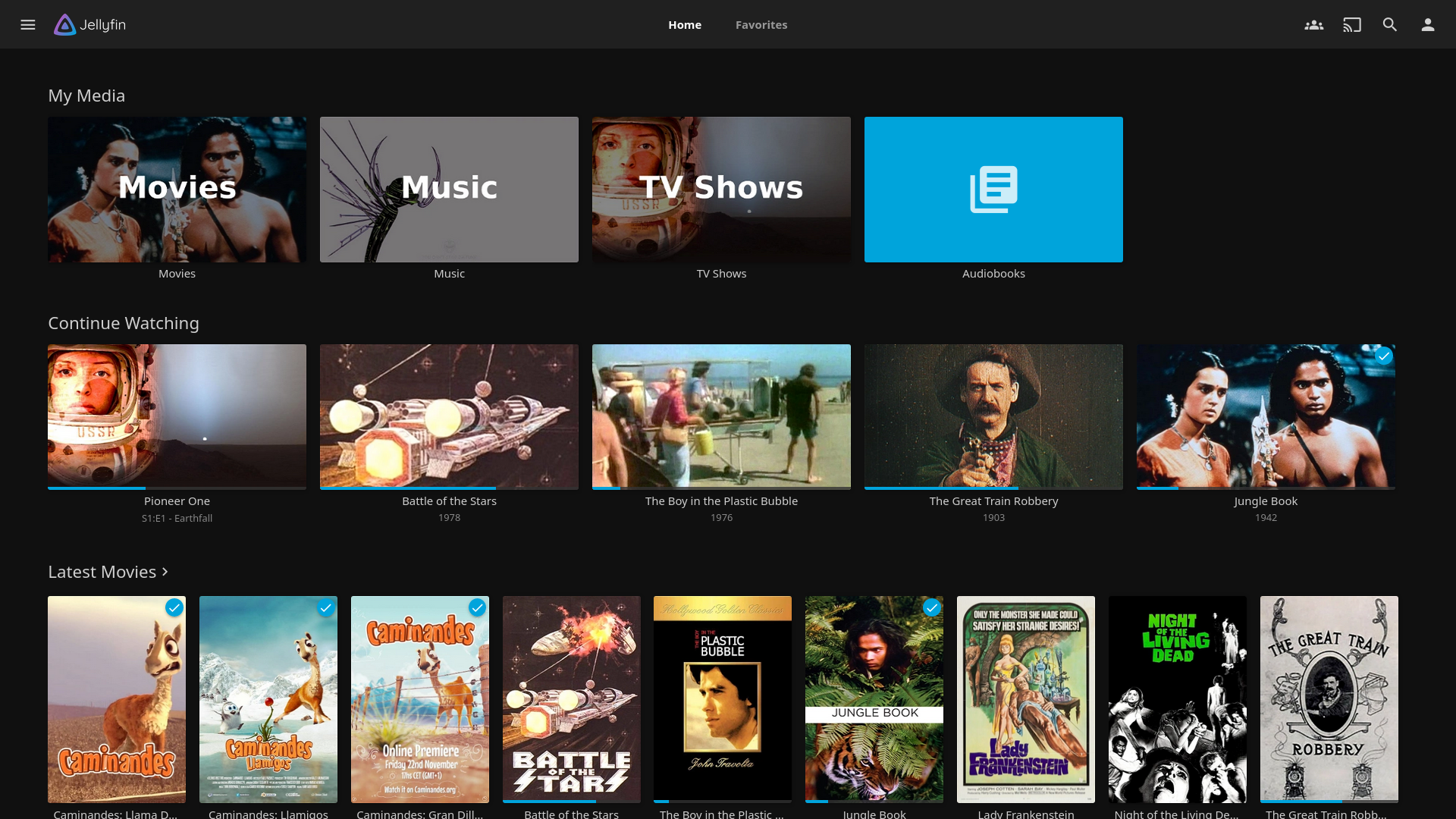
Jellyfin stands out as a free, open-source media server, offering a centralized platform for all your media. It's particularly appealing for those new to media servers, thanks to its no-cost nature and user-friendly interface. Jellyfin ensures all your media is accessible in one place, streamlining your viewing experience. Whether it's movies, TV shows, music, or photos, Jellyfin has you covered.
Key Features of Jellyfin
- Media Management: Jellyfin supports a wide range of media formats, allowing you to manage movies, TV shows, music, and photos in one place.
- Multiple User Profiles: Create separate profiles for different users, each with personalized settings and watch lists.
- Streaming to Any Device: Stream your media to any device, including smartphones, tablets, smart TVs, and more.
- Plugins and Customization: Enhance Jellyfin's functionality with a variety of plugins, allowing you to customize your media server to suit your needs.
Portainer: Effortless Docker Container Management
For those new to server management, Portainer simplifies the process. It provides a graphical interface for managing Docker containers, making it less intimidating for beginners. Portainer is crucial for maintaining the efficiency of your media server, especially when juggling multiple applications. With Portainer, you can easily deploy and manage your media server applications.
Key Features of Portainer
- User-Friendly Interface: Portainer’s GUI makes it easy to manage Docker containers, images, networks, and volumes.
- Application Templates: Quickly deploy common applications using pre-configured templates.
- Detailed Analytics: Monitor the performance of your containers with detailed metrics and logs.
- Access Control: Manage user access to different containers and applications, ensuring secure and efficient server management.
Why These Tools Are Essential for Your Media Server
Combining Sonarr, Radarr, Jellyfin, and Portainer creates a powerful, cohesive media server experience. This synergy ensures a smooth transition for cord-cutters, providing a comprehensive solution for media management that's both efficient and user-friendly. By leveraging these tools, you can automate and simplify the management of your media library, freeing up more time to enjoy your content.
Benefits of a Unified Media Server Setup
- Automation: Reduce manual management by automating downloads, organization, and updates.
- Centralization: Keep all your media in one place, accessible from any device.
- Scalability: Easily add new media or expand your server capabilities with minimal effort.
- Customization: Tailor your media server to your specific needs with a wide range of settings and plugins.
Conclusion: Start Your Cord-Cutting Journey with Confidence
With Sonarr, Radarr, Jellyfin, and Portainer, you're well-equipped to embark on your cord-cutting journey. These tools offer a streamlined approach to managing your media, making it easier than ever to break free from traditional media constraints. By setting up your own Ubuntu media server, you gain control over your media consumption and enjoy a more personalized viewing experience.
Ready to Learn More?
For detailed installation guides and more insights, visit our YouTube channel: Steve's Tech Stuff. There, you will find comprehensive tutorials to help you set up and optimize your media server, ensuring you get the most out of your cord-cutting experience.