

A logo is one of the most important branding elements for any business. It’s what people will see first, and it can make or break a first impression. But creating a logo can be expensive and time-consuming, especially if you’re not a designer.
That’s where Looka AI logo maker comes in. Looka is an online platform that uses artificial intelligence to create custom logos for businesses of all sizes. It’s affordable, easy to use, and customizable, so you can create a logo that’s perfect for your brand.
In this blog post, we’ll show you how to use Looka AI logo maker to create your own custom logo. We’ll also answer some of the most common questions about Looka, so you can make an informed decision about whether or not it’s the right logo maker for you.
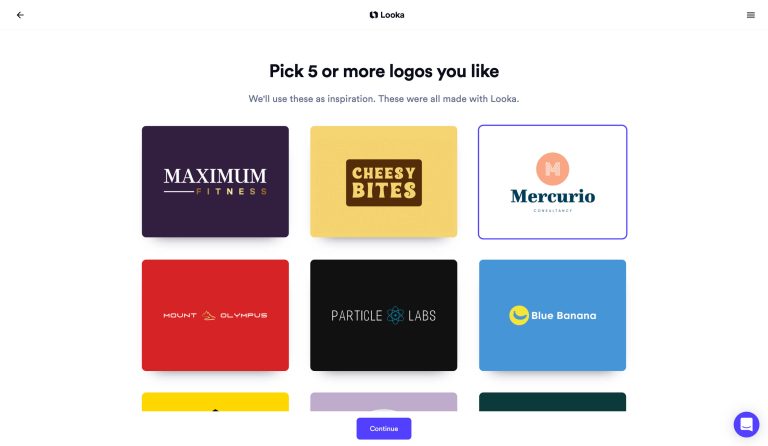
Looka is an online platform that uses artificial intelligence to create custom logos for businesses of all sizes. It’s a one-stop shop for creating your logo, from start to finish.
To use Looka, simply create an account and answer a few questions about your business. Then, Looka’s AI will generate a variety of custom logo designs for you to choose from.
You can then customize your logo’s colors, fonts, and other elements until you’re happy with the design.
Once you’re happy with your logo, you can purchase it and download it in a variety of file formats. You can also use Looka’s logo builder to create variations of your logo for different applications, such as social media and print.
There are many benefits to using Looka AI logo maker, including:
- Affordable: Looka’s logo packages start at just $20. This is a fraction of the cost of hiring a professional logo designer.
- Easy to use: Looka is designed to be easy to use, even for people with no design experience. Simply answer a few questions about your business, and Looka’s AI will generate a variety of custom logo designs for you to choose from.
- Customizable: Once you’ve chosen a logo design, you can customize it to your liking. You can change the colors, fonts, and other elements until you’re happy with the final design.
- Professional: You can be sure that your logo will look great because Looka uses professional designers to create its logo designs.
- Online: Looka is an online platform, so you can create your logo from anywhere in the world.
Looka AI logo maker is perfect for businesses of all sizes, from startups to large enterprises. It’s also a great option for people who want to create their own custom logo but don’t have any design experience.
If you’re looking for an affordable, easy-to-use, and customizable logo maker, then Looka AI is a great option for you.
1. Create an account
Visit the Looka website and click on the “Create an account” button. Enter your name, email address, and password, and then click on the “Create account” button.
2. Answer a few questions about your business
After creating an account, you will be asked to answer a few questions about your business. Looka’s AI will generate unique logo designs for you using this information.
3. Preview logos
Once you have answered the questions about your business, Looka’s AI will generate a variety of custom logo designs for you to preview. You can browse through the designs and click on the “Like” button for the ones that you like.
4. Customize your logo
Once you have found a logo design that you like, you can customize it to your liking. You can change the colors, fonts, and other elements of the logo until you are happy with the final design.
5. Purchase your logo
Once you are happy with the design of your logo, you can purchase it. Looka offers a variety of logo packages, starting at just $20.
Q: How much does it cost to use Looka AI logo maker?
A: Looka AI logo maker offers a variety of logo packages, starting at just $20.
Q: Is Looka AI logo maker easy to use?
A: Yes, Looka AI logo maker is designed to be easy to use, even for people with no design experience. Simply answer a few questions about your business and Looka’s AI will generate a variety of custom logo designs for you to choose from.
Q: Can I customize my logo with Looka AI logo maker?
A: Yes, you can customize your logo with Looka AI logo maker. You can change the colors, fonts, and other elements of the logo until you are happy with the final design.
Q: What file formats does Looka AI Logo Maker offer?
A: Looka AI logo maker offers a variety of file formats, including PNG, SVG, and PDF files.
Q: What is Looka AI’s satisfaction guarantee?
A: Looka AI logo maker offers a 100% satisfaction guarantee. If you’re not happy with your logo, you can simply return it for a full refund.



A logo is one of the most important branding elements for any business. It’s what people will see first, and it can make or break a first impression. But creating a logo can be expensive and time-consuming, especially if you’re not a designer.
That’s where Looka AI logo maker comes in. Looka is an online platform that uses artificial intelligence to create custom logos for businesses of all sizes. It’s affordable, easy to use, and customizable, so you can create a logo that’s perfect for your brand.
If you’re looking for an affordable, easy-to-use, and customizable logo maker, then Looka AI is a great option for you.
To learn more about Looka AI logo maker, visit their website today.